Best Color Combinations and Website Color Schemes That Actually Work
Choosing the right website color palette is not about aesthetics alone. Colors directly affect readability, brand trust, accessibility, and conversions. A well-structured website color scheme helps users navigate content effortlessly, highlights important actions, and builds a consistent brand identity.
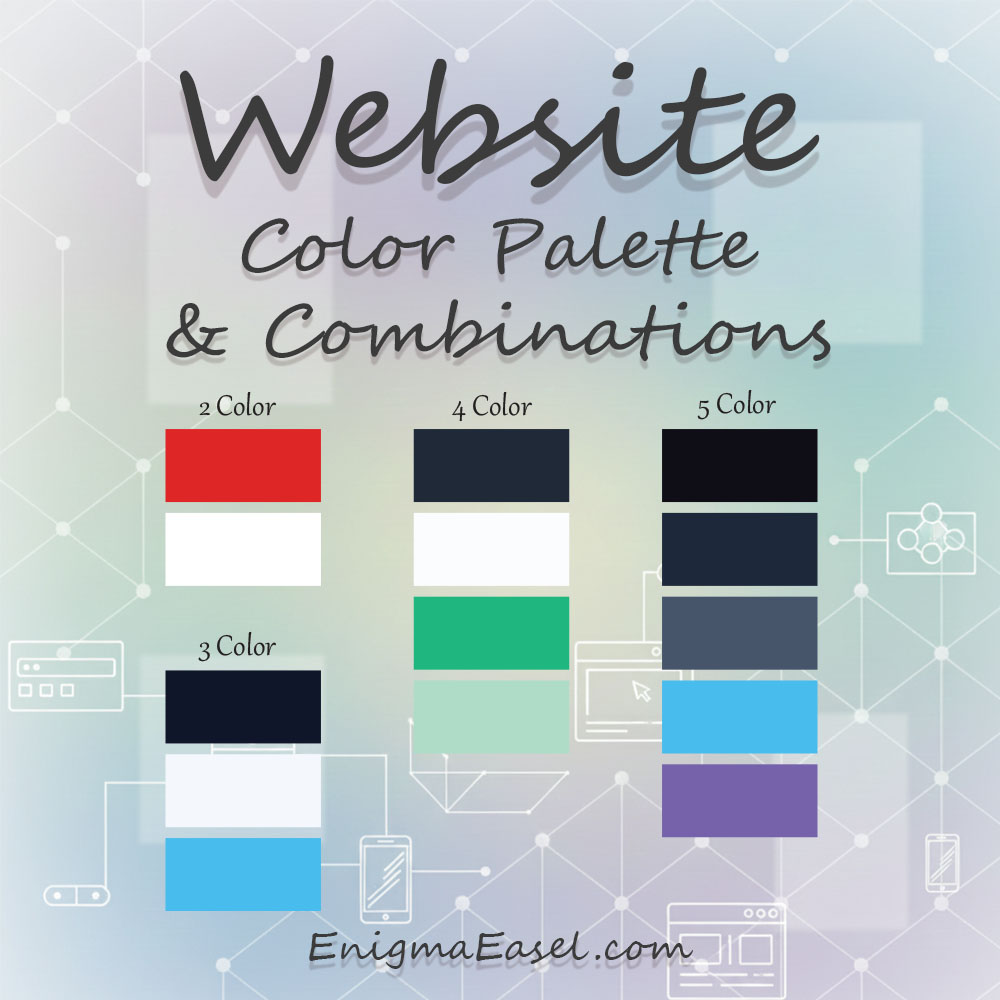
In this guide, you’ll find practical website color palettes — from 2-color combinations to advanced 5-color systems — each explained with real usage roles and best-fit scenarios.
Why Color Palettes for Websites Matter for User Experience and Trust
Color palettes for websites influence user perception within the first 50 milliseconds, long before visitors read any text. A clean palette with sufficient contrast immediately signals professionalism and credibility, while poor color choices can increase bounce rates and reduce engagement.
Readability is directly tied to color contrast. For example, dark text like Charcoal (#1F2933) on a light background such as Off-White (#F9FAFB) reduces eye strain and keeps users on the page longer. Low-contrast combinations, on the other hand, cause users to abandon sites quickly.
Color also determines button visibility and conversions. High-contrast CTA colors like Orange (#F97316) or Green (#22C55E) stand out clearly against neutral backgrounds and guide users toward action without confusion.
Beyond aesthetics, accessibility and inclusivity matter. Website color palettes must support readable text, visible buttons, and clear UI states for all users, including those with visual impairments. Functional color decisions build trust — decorative color choices alone do not.
How to Choose the Right Color Palette for a Website
Before selecting colors, consider these functional factors:
Brand intent: Trust, creativity, luxury, or energy
Industry norms: SaaS, e-commerce, portfolios, blogs
Accessibility: Text contrast must meet WCAG standards
UI structure: Buttons, cards, alerts, links
Scalability: Will this palette work as the site grows?
Always validate your choices using a contrast testing tool to ensure text and buttons are readable. You can test any palette with your Color Contrast Checker and Generator
2 Color Combinations for Websites Design (Minimal & High-Conversion)
Two-color website palettes are ideal for landing pages, startups, and minimalist designs where clarity matters more than decoration.
Charcoal Gray and White Website Color Palette
HEX codes
Charcoal Gray:
#1F2937Pure White:
#FFFFFF
Usage roles
Background: Pure White
Primary text: Charcoal Gray
UI dividers & icons: Charcoal Gray
Best use cases
SaaS dashboards
Documentation websites
Enterprise platforms
Charcoal Gray provides softer contrast than black while preserving excellent readability.
Blue and White Website Color Combination
HEX codes
Blue:
#2563EBWhite:
#FFFFFF
Usage roles
Background: White
Primary text: Blue
CTA buttons: Blue with white text
Best use cases
SaaS websites
Corporate sites
Fintech and tech startups
This combination builds trust and keeps layouts clean.
Deep Navy and White Website Color Scheme
HEX codes
Deep Navy:
#0F172APure White:
#FFFFFF
Usage roles
Background: Pure White
Primary text: Deep Navy
CTA buttons: Deep Navy with white text
Best use cases
Corporate websites
B2B services
Legal and consulting firms
Deep Navy communicates authority without the visual harshness of pure black.
Royal Purple and White Website Color Palette
HEX codes
Royal Purple:
#7C3AEDPure White:
#FFFFFF
Usage roles
Background: Pure White
Accent & CTA: Royal Purple
Headings: Royal Purple
Best use cases
Creative platforms
AI and tech startups
Product landing pages
Royal Purple adds distinction while remaining clean and readable in UI contexts.
Deep Teal and White Website Color Combination
HEX codes
Deep Teal:
#0D9488Pure White:
#FFFFFF
Usage roles
Background: Pure White
Primary accent: Deep Teal
CTA buttons: Deep Teal with white text
Best use cases
Healthcare platforms
SaaS products
Education websites
Deep Teal balances trust and freshness, making it suitable for data-driven interfaces.
Vivid Orange and White Website Color Scheme
HEX codes
Vivid Orange:
#F97316Pure White:
#FFFFFF
Usage roles
Background: Pure White
CTA buttons: Vivid Orange
Highlights & icons: Vivid Orange
Best use cases
Marketing websites
Startup funnels
Conversion-focused landing pages
Vivid Orange creates strong visual emphasis without overwhelming white layouts.
Strong Red and White Website Color Palette
HEX codes
Strong Red:
#DC2626Pure White:
#FFFFFF
Usage roles
Background: Pure White
CTA & alerts: Strong Red
Headings: Strong Red
Best use cases
E-commerce websites
Promotional campaigns
Subscription pages
Strong Red should be used selectively to drive urgency and attention.
Warm Brown and White Website Palette
HEX codes
Warm Brown:
#92400EPure White:
#FFFFFF
Usage roles
Background: Pure White
Headings & accents: Warm Brown
CTA buttons: Warm Brown with white text
Best use cases
Craft brands
Food and beverage websites
Lifestyle platforms
Warm Brown adds authenticity while white maintains clarity.
Dark Slate and White Website Color Combination
HEX codes
Dark Slate:
#1E293BPure White:
#FFFFFF
Usage roles
Background: Pure White
Primary text: Dark Slate
UI elements: Dark Slate
Best use cases
Developer tools
Analytics dashboards
UI design systems
Dark Slate offers excellent contrast while remaining neutral and professional.
Green and White Website Scheme
HEX codes
Green:
#16A34AWhite:
#FFFFFF
Usage roles
Background: White
Accent & CTA: Green
Text: Dark grey or green
Best use cases
Health, wellness, eco-friendly brands
Finance and productivity tools
3 Color Website Color Palettes (Most Practical Choice)
Three-color palettes offer structure: primary, secondary, accent.
Indigo, White, and Emerald Website Palette
HEX codes
Indigo Blue:
#4338CAPure White:
#FFFFFFEmerald Green:
#10B981
Usage roles
Background: Pure White
Primary text & headings: Indigo Blue
CTA buttons & success states: Emerald Green
Best use cases
SaaS products
Fintech platforms
Productivity tools
This palette balances trust, clarity, and positive action signals.
Deep Navy, Soft Gray, and Sky Blue Website Palette
HEX codes
Deep Navy:
#0F172ASoft Gray:
#F1F5F9Sky Blue:
#38BDF8
Usage roles
Background: Soft Gray
Text: Deep Navy
CTA & links: Sky Blue
Best use cases
Corporate websites
B2B landing pages
Professional services
The soft background reduces eye strain while sky blue draws attention to actions.
Charcoal, White, and Amber Website Palette
HEX codes
Charcoal Black:
#1F2937Pure White:
#FFFFFFWarm Amber:
#F59E0B
Usage roles
Background: Pure White
Text & UI elements: Charcoal Black
CTA buttons & highlights: Warm Amber
Best use cases
Marketing websites
Startup homepages
Sales funnels
Amber provides energy without overpowering the interface.
Forest Green, White, and Slate Gray Website Palette
HEX codes
Forest Green:
#166534Pure White:
#FFFFFFSlate Gray:
#334155
Usage roles
Background: Pure White
Primary text: Slate Gray
CTA & accents: Forest Green
Best use cases
Sustainability brands
Finance tools
Professional services
This palette communicates stability, responsibility, and trust.
Royal Purple, White, and Cool Gray Website Palette
HEX codes
Royal Purple:
#6D28D9Pure White:
#FFFFFFCool Gray:
#E5E7EB
Usage roles
Background: Cool Gray
Text: Royal Purple
CTA & feature highlights: Royal Purple
Best use cases
Creative SaaS tools
AI platforms
Design-focused startups
Purple adds personality while gray keeps layouts structured.
Teal, White, and Deep Charcoal Website Palette
HEX codes
Deep Teal:
#0D9488Pure White:
#FFFFFFDeep Charcoal:
#1E293B
Usage roles
Background: Pure White
Text: Deep Charcoal
CTA & interactive elements: Deep Teal
Best use cases
Healthcare platforms
Education websites
Knowledge-based tools
This combination is calm, readable, and highly accessible.
Crimson Red, White, and Dark Gray Website Palette
HEX codes
Crimson Red:
#B91C1CPure White:
#FFFFFFDark Gray:
#374151
Usage roles
Background: Pure White
Text: Dark Gray
CTA & alerts: Crimson Red
Best use cases
Subscription websites
E-commerce promotions
High-urgency landing pages
Red drives action, while gray maintains balance.
Ocean Blue, White, and Soft Sand Website Palette
HEX codes
Ocean Blue:
#0369A1Pure White:
#FFFFFFSoft Sand:
#F5EDE2
Usage roles
Background: Soft Sand
Text: Ocean Blue
CTA & links: Ocean Blue
Best use cases
Travel websites
Lifestyle brands
Content-driven platforms
Soft Sand warms the layout while blue keeps it professional.
Blue, White, and Orange Website Palette
HEX codes
Blue:
#1E40AFWhite:
#FFFFFFOrange:
#F97316
Usage roles
Background: White
Text & headers: Blue
CTA buttons: Orange
Best use cases
Marketing websites
SaaS landing pages
Conversion-focused designs
Navy, Grey, and Teal Website Palette
HEX codes
Navy:
#0F172AGrey:
#E5E7EBTeal:
#14B8A6
Usage roles
Background: Grey
Text: Navy
CTA & highlights: Teal
Best use cases
Dashboards
Corporate platforms
Analytics tools
Black, White, and Red Website Palette
HEX codes
Black:
#0B0B0BWhite:
#FFFFFFRed:
#DC2626
Usage roles
Background: White
Text: Black
CTA & alerts: Red
Best use cases
Media websites
Entertainment brands
High-impact CTAs
4 Color Website Color Schemes (Balanced UI Systems)
Four-color palettes are ideal for structured UIs.
Professional Blue-Gray UI Color Scheme
HEX codes
Midnight Blue:
#0F172ACool Gray:
#E5E7EBPrimary Blue:
#2563EBSoft Cyan:
#22D3EE
Usage roles
Background: Cool Gray
Primary text: Midnight Blue
Primary CTA: Primary Blue
Secondary highlights: Soft Cyan
Best use cases
B2B SaaS platforms
Corporate dashboards
Analytics tools
This scheme delivers authority with subtle accent flexibility.
Clean Neutral with Green Accents Website Scheme
HEX codes
Charcoal Gray:
#1F2937Off-White:
#F9FAFBEmerald Green:
#10B981Mint Green:
#A7F3D0
Usage roles
Background: Off-White
Text: Charcoal Gray
Primary CTA: Emerald Green
Success states & badges: Mint Green
Best use cases
Finance tools
Health platforms
SaaS products
Green accents communicate growth and positive actions.
Dark Mode Website UI Color Scheme
HEX codes
Near Black:
#020617Slate Gray:
#334155Electric Blue:
#38BDF8Success Green:
#22C55E
Usage roles
Background: Near Black
Primary text: Slate Gray
Links & active states: Electric Blue
Success indicators: Success Green
Best use cases
Developer tools
Trading platforms
Dark-mode dashboards
Optimized for contrast and long screen sessions.
Warm Marketing Website Color Scheme
HEX codes
Dark Brown:
#3F2E20Cream White:
#FAF7F2Burnt Orange:
#EA580CGolden Yellow:
#FACC15
Usage roles
Background: Cream White
Text: Dark Brown
Primary CTA: Burnt Orange
Secondary highlights: Golden Yellow
Best use cases
Marketing websites
Brand landing pages
Campaign microsites
Warm tones increase engagement without overwhelming users.
Modern Purple SaaS UI Scheme
HEX codes
Deep Purple:
#4C1D95Lavender Gray:
#EDE9FEViolet Accent:
#7C3AEDSoft Pink:
#FBCFE8
Usage roles
Background: Lavender Gray
Text: Deep Purple
Primary CTA: Violet Accent
Notifications & highlights: Soft Pink
Best use cases
Creative SaaS tools
AI platforms
Startup websites
This scheme adds personality while preserving clarity.
Ocean-Inspired Professional Website Scheme
HEX codes
Deep Blue:
#082F49Mist Gray:
#F1F5F9Sea Blue:
#0EA5E9Aqua Green:
#2DD4BF
Usage roles
Background: Mist Gray
Text: Deep Blue
Primary CTA: Sea Blue
Secondary accents: Aqua Green
Best use cases
Fintech websites
Consulting firms
Corporate services
Cool tones reinforce trust and reliability.
Editorial Website Color Scheme
HEX codes
Ink Black:
#0F172APaper White:
#FFFFFFMuted Gray:
#CBD5E1Accent Red:
#DC2626
Usage roles
Background: Paper White
Text: Ink Black
UI separators: Muted Gray
Highlights & alerts: Accent Red
Best use cases
News websites
Content platforms
Blogs and magazines
Designed for long-form readability and clarity.
Elegant Dark Neutral Website Scheme
HEX codes
Dark Charcoal:
#111827Soft Gray:
#E5E7EBCool Blue:
#3B82F6Subtle Violet:
#A78BFA
Usage roles
Background: Soft Gray
Text: Dark Charcoal
Primary CTA: Cool Blue
Secondary highlights: Subtle Violet
Best use cases
Premium SaaS
Professional portfolios
Business websites
This palette feels refined while remaining highly usable.
Neutral Base with Two Accent Colors
HEX codes
Dark Grey:
#1F2933Light Grey:
#F3F4F6Blue:
#2563EBAmber:
#F59E0B
Usage roles
Background: Light Grey
Text: Dark Grey
Primary CTA: Blue
Secondary CTA / highlights: Amber
Best use cases
SaaS products
Admin panels
Web apps
Light Mode UI Color Scheme
HEX codes
White:
#FFFFFFSlate:
#334155Sky Blue:
#38BDF8Green:
#22C55E
Usage roles
Background: White
Text: Slate
Links: Sky Blue
Success states: Green
Best use cases
Productivity tools
Blogs
Documentation sites
5 Color Website Palettes (Advanced & Brand-Heavy Systems)
Five-color palettes work best for large websites and design systems.
Modern SaaS Light Website Color System
HEX codes
Primary Indigo:
#4338CADeep Slate:
#1E293BSoft Gray:
#F1F5F9Sky Blue Accent:
#38BDF8Success Green:
#22C55E
Usage roles
Background: Soft Gray
Primary text: Deep Slate
Primary CTA: Primary Indigo
Secondary actions & links: Sky Blue Accent
Success states: Success Green
Best use cases
SaaS platforms
Startup websites
Productivity tools
This system supports clarity, conversion, and scalability.
Professional Fintech Website Color System
HEX codes
Midnight Navy:
#020617Steel Gray:
#334155Clean White:
#FFFFFFTrust Blue:
#2563EBAlert Amber:
#F59E0B
Usage roles
Background: Clean White
Primary text: Steel Gray
Headers & emphasis: Midnight Navy
Primary CTA: Trust Blue
Warnings & highlights: Alert Amber
Best use cases
Fintech platforms
Banking dashboards
Investment websites
Designed to convey trust and data clarity.
Creative Brand Website Color System
HEX codes
Royal Purple:
#6D28D9Soft Lavender:
#EDE9FECharcoal Text:
#1F2937Coral Accent:
#FB7185Highlight Yellow:
#FACC15
Usage roles
Background: Soft Lavender
Text: Charcoal Text
Primary CTA: Royal Purple
Secondary highlights: Coral Accent
Notifications & emphasis: Highlight Yellow
Best use cases
Creative agencies
Personal brands
Portfolio websites
Adds personality while preserving structure.
Healthcare & Wellness Website Color System
HEX codes
Calm Teal:
#0D9488Soft Mint:
#ECFEFFClean White:
#FFFFFFHealing Green:
#22C55ETrust Blue:
#2563EB
Usage roles
Background: Soft Mint
Content sections: Clean White
Primary text: Calm Teal
CTA buttons: Trust Blue
Success & confirmation: Healing Green
Best use cases
Healthcare platforms
Wellness apps
Appointment systems
This palette feels reassuring and accessible.
Editorial & Content Platform Color System
HEX codes
Ink Black:
#0F172APaper White:
#FFFFFFNeutral Gray:
#CBD5E1Accent Red:
#DC2626Link Blue:
#2563EB
Usage roles
Background: Paper White
Text: Ink Black
UI dividers: Neutral Gray
Alerts & emphasis: Accent Red
Links & CTAs: Link Blue
Best use cases
News websites
Blogs and magazines
Content platforms
Optimized for long-form readability.
E-commerce Website Color System
HEX codes
Deep Charcoal:
#111827Soft White:
#F9FAFBBrand Blue:
#2563EBSale Red:
#EF4444Success Green:
#22C55E
Usage roles
Background: Soft White
Text: Deep Charcoal
Primary CTA: Brand Blue
Discounts & urgency: Sale Red
Order confirmations: Success Green
Best use cases
Online stores
Product marketplaces
Subscription commerce
Built for clarity, urgency, and trust.
Education Platform Website Color System
HEX codes
Academic Blue:
#1E40AFSoft Gray:
#F1F5F9Dark Text Gray:
#374151Highlight Yellow:
#FACC15Success Green:
#16A34A
Usage roles
Background: Soft Gray
Text: Dark Text Gray
Primary actions: Academic Blue
Highlights & tips: Highlight Yellow
Progress indicators: Success Green
Best use cases
Online courses
Learning management systems
Educational portals
Encourages focus and clarity.
Premium Dark Brand Website Color System
HEX codes
Near Black:
#020617Dark Slate:
#1E293BMuted Gray:
#475569Electric Blue:
#38BDF8Accent Violet:
#8B5CF6
Usage roles
Background: Near Black
Cards & surfaces: Dark Slate
Secondary text: Muted Gray
Primary CTA: Electric Blue
Secondary highlights: Accent Violet
Best use cases
Premium SaaS
Developer tools
High-end digital products
Designed for depth, contrast, and modern appeal.
Full Brand Website Color System
HEX codes
Primary Blue:
#1D4ED8Dark Blue:
#1E293BLight Grey:
#F1F5F9Accent Orange:
#FB923CSuccess Green:
#22C55E
Usage roles
Background: Light Grey
Text: Dark Blue
Primary CTA: Blue
Secondary CTA: Orange
Status indicators: Green
Best use cases
SaaS platforms
Large brands
Scalable UI systems
Dashboard and SaaS Website Palette
HEX codes
Dark Slate:
#0F172ACard Grey:
#1E293BBorder Grey:
#334155Cyan Accent:
#22D3EEViolet Accent:
#8B5CF6
Usage roles
Background: Dark Slate
Cards: Card Grey
Borders: Border Grey
Primary actions: Cyan
Secondary highlights: Violet
Best use cases
Dark mode dashboards
Analytics tools
Developer platforms
Website Color Palettes by Industry
SaaS & Tech: Blue-based palettes with neutral backgrounds
E-commerce: Neutral base with strong CTA colors
Portfolios: Monochrome or muted accent palettes
Blogs: Light backgrounds with subtle accents
Finance: Blue, green, and grey combinations
Website Color Palette Accessibility & Contrast
Accessibility is non-negotiable. All text and buttons should pass WCAG contrast guidelines.
Before finalizing any palette:
Test text vs background contrast
Test CTA buttons separately
Check hover and focus states
Use your Color Contrast Checker and Generator to validate every combination
Common Website Color Palette Mistakes to Avoid
Using too many accent colors
Low-contrast text on colored backgrounds
Trend-only palettes without accessibility checks
Bright CTAs on bright backgrounds
If you need to convert HEX to RGB, HSL, or CMYK while refining your palette, use your All Color Code Converter
FAQs – Color Palettes for Websites
Q1: What are the best color palettes for websites?
The best color palettes for websites use neutral backgrounds with high-contrast accent colors. Proven examples include White (#FFFFFF) + Blue (#2563EB) + Orange (#F97316) for conversion-focused sites, and Light Grey (#F3F4F6) + Navy (#0F172A) + Teal (#14B8A6) for professional dashboards. These palettes balance readability, trust, and action.
Q2: How many colors should a website color palette have?
Most websites perform best with 3 to 4 colors. A common structure includes a background color like White (#FFFFFF), a text color such as Dark Slate (#1E293B), a primary accent like Blue (#2563EB), and an optional secondary accent such as Amber (#F59E0B). Two-color palettes work for minimal landing pages, while 5-color systems suit large platforms.
Q3: Are 2 color combinations good for websites?
Yes, 2 color combinations are effective for simple websites when contrast is strong. Examples include Black (#111111) + White (#FFFFFF) for editorial sites and Blue (#1D4ED8) + White (#FFFFFF) for SaaS landing pages. However, additional colors are often needed for alerts, hover states, and accessibility.
Q4: What colors improve website conversions?
High-contrast CTA colors improve conversions when placed on neutral backgrounds. Commonly effective options include Orange (#F97316), Green (#22C55E), and Blue (#2563EB). These colors draw attention without overwhelming the interface when used strategically.
Q5: How do I check if my website color palette is accessible?
You should test text, background, and button colors for sufficient contrast. For example, Dark Grey (#1F2933) on White (#FFFFFF) typically passes WCAG standards, while light text on light backgrounds often fails. You can validate accessibility using a contrast testing tool before finalizing your palette.
Final Thoughts
The best website color palettes are functional, accessible, and scalable. Whether you’re using a simple 2-color combination or a full 5-color design system, every color should have a clear role.
Test your palettes, validate contrast, and refine color formats using your tools to create websites that look professional and convert effectively.